
When a homeowner's pipe bursts at 7 AM, they are not browsing websites. They are scanning Google Maps. They pick the business with the most reviews. Every time.
That is not a guess. That is what the data shows. A service business with 185 Google reviews will consistently get the call over a competitor with 47, even if the lower-reviewed business is closer and cheaper.
Reviews are not a vanity metric. They are the first filter every new customer applies before they ever dial your number.
Why Most Service Businesses Stall at the Same Review Count
Most service business owners know they should have more reviews. Most have one or two customers they have been meaning to ask. Most have a review count that has not moved in months.
It is not because their customers are unhappy. It is because asking for a review requires an extra step, and that step gets skipped every time there is a job to finish, an invoice to send, or a truck to load.
The businesses getting 10 to 15 new reviews a month are not asking harder. They have a system that asks every time, automatically, after every job.
The simple reason a consistent ask beats an occasional one: Google cares about recency. A business with 50 reviews from three years ago will rank below a business with 30 reviews from the last six months. Staying current matters more than hitting a specific number.
How the Review Request Works
The fix is a single automated text sent after every job closes.
When you mark a job complete, a text fires to the customer within minutes. It includes your direct Google review link. One tap and they are on your review page, ready to rate. No searching for your business. No navigating a confusing menu. One tap.
The timing is deliberate. A customer who just had a good experience is more likely to leave a review in the hour after the job than at any other point. That window closes fast. An automated request hits while the experience is fresh, before life gets in the way.
You do not have to remember to ask. You do not have to feel awkward about it. The system handles it the same way, every time.
Want this running for your business? We handle the entire setup.
Let's Get Started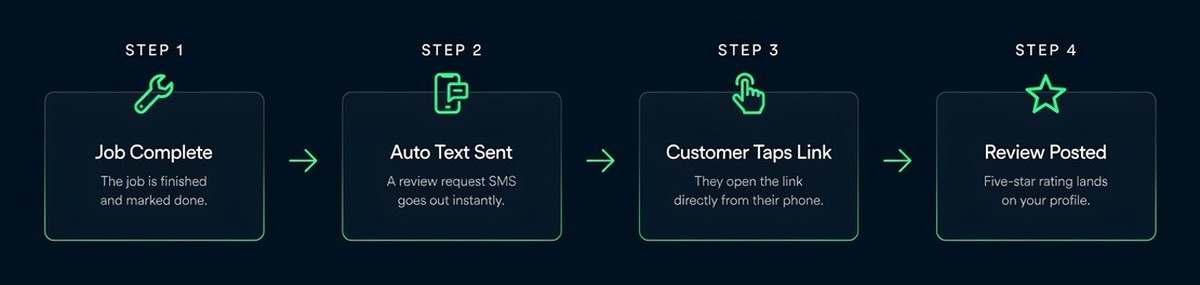
What You Actually Need to Set This Up
The same as before: nothing new. This system runs on Google Workspace tools you already own.
A trigger in Google Apps Script fires when a job is marked complete in your Google Sheet. It sends a text from your business number through your existing Google account. The review link goes directly to your Google Business Profile review page.
No third-party review platform. No monthly subscription. No new app to manage. If you are already using Gmail and Google Sheets to run your business, you already have everything this requires.
See how this fits into the full 10-system automation stack, or learn how the build process works.
What Happens When You Start Asking Consistently
The first review usually comes within a week. A few more follow in the first month. By 90 days, most service businesses running this system have doubled their review count.
The downstream effect matters. More reviews improve your ranking in Google Maps. A higher ranking means more visibility when someone searches for a service business in your area. More visibility means more calls. More calls means more jobs.
That chain reaction starts with a single text sent automatically after every job.
One more thing: reviews also protect you. A business with 80 reviews at 4.6 stars handles a bad review differently than a business with 12 reviews at 4.1. One negative review is a footnote in a large sample. In a small one, it is a warning sign.
Building your review count is not just about winning new customers. It is about not losing them to a competitor who has been asking consistently.
Responding to Reviews Matters Too
Getting more reviews is half the equation. The other half is what you do with them.
When you respond to a review, the reviewer sees it. Other potential customers see it. Google sees it. A business that responds to every review, positive and critical, signals that a real person is paying attention.
The response does not have to be long. A two-sentence reply that thanks the customer and references the job shows you read it. That is enough. It builds trust faster than 10 more silent 5-star reviews ever could.
If you get a 2-star review, respond to it professionally. Explain what happened from your perspective, invite them to contact you directly, and leave it at that. A thoughtful response to a critical review often impresses potential customers more than the negative review damages you.
For a deeper look at getting your Google Business Profile working for your business, see the Uptick Co. GBP Guide.